Day 13: the brains arrived, and wouldn't say a word
Last time I wrote here, I said I couldn’t wait for the brains to show up so I could find out how this thing thinks and moves.
They showed up. A Jetson Orin Nano, the piece this whole project has been arranging itself around since the very first spreadsheet. Small, heavier than expected, with a fan on top that looks far too serious for something this size.
And then it sat on my desk saying absolutely nothing for the rest of the evening.
No monitor, no problem — allegedly
I don’t have a spare monitor. That’s fine, I thought, because these boards let you do the whole first-boot setup over a cable to your laptop instead. Plug in, open a terminal, watch it start up, answer the setup questions. Done.
Except that trick only works once the operating system is already running. It’s the computer politely introducing itself to your laptop, and a computer can only be polite once it’s awake.
Mine was not awake. Mine had nothing to wake up into.
It’s not a computer
Here is an assumption I had never once examined: I thought I had bought a computer. A small one, an odd-shaped one, but a computer — the kind of object you plug in and it starts.
It has no operating system. There’s nothing on it to start.
Fine, I thought. I’ll install one. Perfectly normal. Install it where?
That’s the question that pulls the whole thread out, because the answer is nowhere.
This board isn’t a computation unit. It’s a computation workhorse — a great deal of capability and nothing whatsoever to apply it to, sitting there waiting for someone to hand it a brain. But the brain has to be uploaded, and the upload has to begin from an operating system, and the operating system has to be stored somewhere.
And there is no somewhere.
A laptop is a processor, some memory, and a disk inside the case. This is a processor, some memory, and an empty slot where the disk is your problem. Whatever you eventually put in doesn’t become an accessory — it becomes the machine’s actual, permanent hard drive.
I sat with that for a minute. I had bought the brain and nowhere to keep a single thought in it.
Three wires
Which left exactly one way in: the oldest one there is.
Somewhere on the board is a row of pins speaking a serial protocol old enough to predate almost everything else in the room. You buy a small USB-to-serial adapter, run three of its leads onto those pins — send, receive, ground — put the other end into your laptop, and open a terminal window. No operating system required, because this line is wired straight into the firmware rather than into anything running on top of it.
That’s the theory. Here’s the evening.
I wired into the big 40-pin header along the edge of the board. The obvious one. The one in every photo on the internet, the one you physically cannot miss. Powered on.
Nothing. A blank terminal, blinking at me.
So I swapped the send and receive wires, in case I’d crossed them. Nothing.
Then I tested the adapter by shorting its own send and receive together and typing at it — everything I typed came straight back, perfectly. Which meant the cable worked, the laptop worked, the terminal settings were right, and the board’s power light was on with its fan spinning. Every single component functioning correctly, producing precisely zero output.
My favorite category of problem: nothing is broken and nothing works.
The 40-pin header does carry a serial port. It works fine. It simply has nothing whatsoever to say while the machine is starting up, because it isn’t the one the firmware speaks through.
The one I needed is called J14, and NVIDIA has hidden it beautifully. A single unassuming row of pins tucked away near the power LED, smaller than the fan connector, nowhere near the header everyone photographs, and easy to skip past a dozen times without registering that it’s there. I’m not sure I found it so much as got lucky.
And when I finally did find it and turned the board over — every pin labeled. In tiny letters. On the underside. The whole time.
I moved three wires across. Powered on.
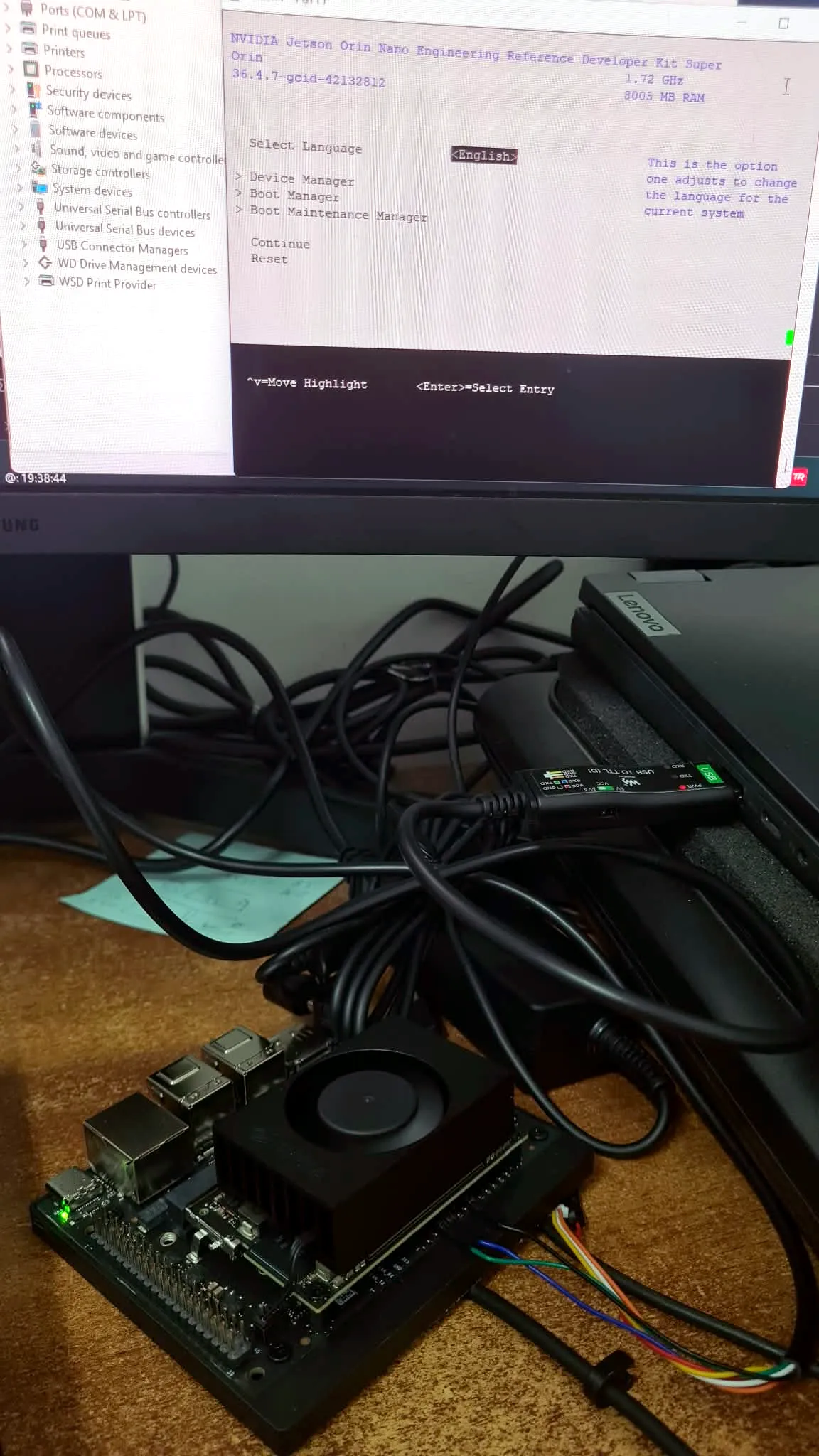 It talks. Not much, and only about itself, but it talks.
What it said
A name, a clock speed, an amount of memory, and a version number.
That version number was the whole reason for the exercise. Depending on what it said, I was either ready to install the operating system directly, or facing a multi-step detour to update the board’s firmware first — which needs a memory card I’d have had to go buy specifically for one use and then never touch again.
It was the good number. No detour.
Which is a strange thing to feel triumphant about. I spent an evening finding three pins in order to read one line of text that told me I could skip a procedure. But that is the win, and I’m claiming it: the machine is alive, it’s talking to me, and I know exactly what it needs next.
Still not booted
Because of course the SSD I had ready doesn’t work.
I had a perfectly good spare drive in a drawer. Right shape, right connector, slides into the slot beautifully. Turns out “M.2” describes the plug, not the language — and mine speaks a different protocol entirely to the one this board understands. It fits, and it does nothing. Something like a plug that goes into the socket in a country running a different voltage.
So the brains are on my desk, awake, waiting, with nowhere to keep a single thought.
New drive is ordered. Next time it should actually boot into something.
Probably.